





Welcome to PNC BeneFit Plus
Important Transition Information
Converting is Simple
Discover the ease and advantage of adopting PNC Benefit Plus for your company and team.
Effective January 1, 2026, your PacificSource Administrators benefit spending program transitions to PNC BeneFit Plus — introducing a unified platform for HSAs with investment capabilities and integrated FSAs, HRAs, Dependent Care, Parking and Transit and Lifestyle Spending Accounts.
The PNC BeneFit Plus Employer Services team will support you during the transition and going forward. Please contact them at:
PNC BeneFit Plus Employer Services
Toll Free 844.356.9994 | Fax 855-628-5950
Learn more about
Or enroll in an upcoming
Employee
Key Information & Timeline
Log in to your PacificSource Administrators account to verify that your profile information — including email, mobile number, and address — are up to date. Please make necessary updates to ensure you receive relevant communications and your PNC BeneFit Plus debit card.
Starting December 8, 2026, employees will be able to access their accounts via the PNC BeneFit Plus consumer portal and mobile app. We will provide instructions to employees on how to log in and manage their accounts.
Employees will begin receiving welcome emails from PNC BeneFit Plus.
This is the last day for employees to use their current PacificSource Administrators debit card (if applicable).
Employees enrolled by the November 24, 2025, deadline will receive their PNC BeneFit Plus debit cards on or before this date.
Claims processing for 2025 plan years and mid-year plans will be unavailable during this time. The 2026 plans with a start date of January 1, 2026, will continue without interruption and access will remain fully available.
Employees will begin receiving welcome emails from PNC BeneFit Plus. Employees should receive their PNC BeneFit Plus debit cards by early February.
Employees will be able to access their accounts via the PNC BeneFit Plus consumer portal and mobile app. We will provide instructions to employees on how to log in and manage their accounts.
Any applicable rollover funds will be made available to employees starting on this date.
Employer
Key Information & Timeline
Renewal Information should be signed and returned to PacificSource Administrators. Please confirm your renewal and submit changes by this date to ensure new plans contain any changes for 2026.
Complete and submit the for direct payments to Pacific Source Administrators by this date to ensure your plan is active on January 1, 2026. For employers with a January 1, 2026, plan start date, we request that all enrollment materials be submitted to PacificSource Administrators by November 24. While you may submit enrollments and changes after this date to PacificSource Administrators, submitting by November 24 will help avoid potential delays in member benefits.
A training webinar on basic employer functions, including how to enroll employees, will be held on Tuesday, December 9 at 1 p.m. PST. Please watch for the email invitation.
PNC BeneFit Plus Transition Webinar
The PNC Know Your Customer (KYC) verification process must be completed by this date.
Employer Resources
- Please reference the email communications PNC sent on 10/14/25 and 10/28/25
- included in the 2nd communication
- 12/9 Employer Portal Webinar information
Have Questions?
Review our most common FAQs
Transition Period
Your PacificSource Administrators benefit spending program will transition to PNC BeneFit Plus effective January 1, 2026.
PNC BeneFit Plus offers advanced technology and a focus on employee engagement and education to help employers and employees manage healthcare costs. For employers, PNC BeneFit Plus helps you manage your company’s benefit spending account programs with reduced administrative burden and access to analytics and insights on your employees’ use, trends and engagement.
For employees, PNC BeneFit Plus offers a streamlined experience with user-friendly, digital tools and notifications to help manage expenses and plan for the future.
No. To ensure a smooth transition, we are providing you with a new PNC BeneFit Plus Administrative Services Agreement (ASA). Service will continue without disruption under this new agreement, which reflects our commitment to delivering high-quality support.
You may renew as usual by submitting plan changes and enrollments to PacificSource Administrators, and we will manage the transition. In addition, please review the New provided to you in previous communications. No action is needed if you agree to the terms. Continued use of services after January 1, 2026, will indicate your acceptance. Complete and submit the for direct payments to Pacific Source by this date to ensure your plan is active on January 1, 2026.
Yes. PNC will contact you to collect company information required for KYC verification. This is a federal requirement under the FinCEN Customer Due Diligence (CDD) Final Rule, which mandates financial institutions to obtain beneficial ownership and controlling party information for certain legal entities
The effective date of the Administrative Service Agreement is January 1, 2026.
The date on the front page of the Administrative Services Agreement is the date the Administrative Services Agreement (ASA) was last updated.
If you wish to opt out of this transition, please notify PacificSource Administrators immediately.
November 24, 2025, is the last day for enrollment materials to be submitted to PacificSource Administrators to ensure accounts are created and debit cards are in hand on January 1, 2026.
General Administration
Claims funding: PNC utilizes a daily claims-based funding process for efficiency and additional client benefits. This method allows employers to retain plan assets until claims activity occurs. As claims are processed and become eligible for reimbursement, an ACH transaction is initiated to debit the employer’s designated bank account based on the daily claims total.
Billing & Fees: PNC bills employers directly, with monthly notifications and ACH debits occurring on the second business day of each month. You will receive advance notice of the amount. Most clients will benefit from lower administrative fees and access to a broader product suite under PNC’s standard pricing.
Employee Enrollment Processing: PNC supports flexible enrollment options, including:
- Online entry via the Employer Portal
- File uploads directly to the Employer Portal
- Secure FTP file transfers
Accounts are created based on demographic and enrollment information provided by an employer, carrier, or their Human Resources Information System (HRIS) vendors. Once enrollment data is received, employee accounts are automatically created, and users are guided through a simple online registration and account management experience.
Reporting is accessible through the PNC BeneFit Plus Employer Portal. Key features include:
- Custom Access Controls: You decide who sees what. Reports and notifications can be tailored to each user’s role.
- Self-Service Tools for Employers:
- Flexible Reporting: Run reports on your schedule or on demand. Choose from PDF, Excel, or data file formats, with customizable parameters.
- Employee Lookup: Quickly find employee information to help answer questions or resolve issues.
- NEW: Employer Portal Analytics: This tool provides valuable and important data points — revealing insights into employee behaviors, characteristics, and trends — to help employers shape strategic program decisions. You can also benchmark your employer performance against our portfolio and, when available, industry standards.
PNC Benefit Plus is fully integrated with Employee Navigator and has the ability to integrate with most national and regional HRIS / benefit administration platforms and payroll vendors.
Yes. However, it is not automatically included with the PNC BeneFit Plus offering. If you would like PNC to conduct NDT, please contact PNC BeneFit Plus Employer Services after January 1, 2026, to request this service. The fee associated with NDT testing is as follows: $200/First Test (which include 1 Midyear test); $50 for retest.
For employers with January 1, 2026, renewals, continue to use the same process with PacificSource Administrators to process any enrollment changes for the coming year. These changes need to be submitted to PacificSource Administrators (PSA) by November 24, 2025. PSA will then transmit those changes to PNC.
After November 24, employers can leverage the Import tool through the PNC BeneFit Plus Employer portal to submit demographic and enrollment information. An overview of the process is available in the included in the communication sent on October 14th.
Note: Contribution files will no longer be necessary. PNC uses an assumed payroll method which takes the employer's payroll schedule and calculates the per pay election amount.
Yes. There is no charge for Plan Documents.
Employer Billing & Fees
You previously received an that allows PNC to debit / credit your company’s checking account for applicable services and fees. If you have not done so already, please complete and return the form to: by November 24, 2025, to ensure your plan is active on January 1, 2026. Please follow the instructions in Step 3 of the form regarding updates to the ACH filter settings on your account(s).
PNC utilizes a daily claims-based funding process due to its efficiency and client benefits. This method allows employers to retain plan assets until claims activity occurs. As claims are processed and become eligible for reimbursement, an ACH transaction is initiated to debit the employer’s designated bank account based on the daily claims total. If there are no claims on a particular day, there will be no transaction for that day.
PNC bills employers directly, with monthly notification and ACH debits occurring on the second business day of each month. You will receive advance notice of the amount. Most clients will benefit from lower administrative fees and access to a broader product suite under PNC’s standard pricing.
Employer Portal
This detailed provides a comprehensive overview of using the portal, including login procedures, file submission, enrollment and contribution processing, and reporting tools to help you navigate the portal with ease. Your portal credentials and information about logging in will be sent to you directly before the transition on January 1, 2026. A training webinar on basic employer functions, including how to enroll employees, will be held on Tuesday, December 9 at 1 p.m. PST. Please watch for the email invitation.
Employee Accounts
Employees can go to www.participant.pncbenefitplus.com. Instructions for logging in will be sent to employees via a Welcome email.
- For plans that renew on January 1, 2026, Welcome emails will be delivered mid-December.
- For mid-year plans, Welcome emails will be delivered in mid-January
For employers with January 1, 2026, renewals, PNC BeneFit Plus Debit Cards will be mailed mid-December for all enrollments uploaded by the November 24, 2025, enrollment submission deadline date. For employers with mid-year renewals, debit cards will be mailed in January. Please see image of the card below.
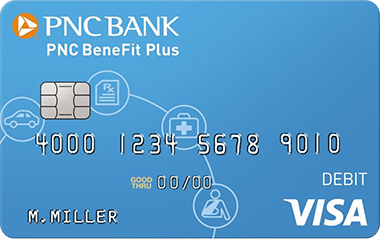
One debit card will be issued per account. Employees may request additional cards for their spouse and/or eligible dependents at no cost. These additional cards will be issued in the name of the spouse or dependent.
If an employee does not use their PNC BeneFit Plus Debit Card, they have several convenient options for submitting reimbursement claims:
- Online Claim Submission: Log in to their PNC BeneFit Plus consumer portal and select the “File a Claim” option from the homepage. Follow the guided steps to enter claim details and upload any required supporting documentation directly through the portal.
- Mobile App Submission: Use the PNC BeneFit Plus Mobile App to file a claim. The app allows participants to follow simple prompts and securely upload supporting documentation by taking a photo with their mobile device.
- Paper Form Submission: Participants may also file a claim using the Reimbursement Request Form, available under the “My Resources” tab.
Because FSA and HRA accounts are tax-advantaged, the IRS has specific guidelines that require all transactions — even those made using a payment card — to be substantiated to verify that a purchase is an eligible expense. To help meet IRS guidelines and avoid adverse tax consequences, the PNC Health Account Services Claims Team is diligent in the execution of the substantiation process. This is a helpful resource for guiding your employees through the process.
PNC will maintain the file integration with PacificSource Health Plan. The employee experience will alter slightly as they may determine which expenses they want to submit a claim for:
Employees will access the PNC BeneFit Plus Consumer Portal to review claims data available in the Expense Tracker. After identifying the claim they wish to reimburse, they will follow the on-screen prompts to initiate reimbursement. All reimbursements will be issued directly to the participant, consistent with PacificSource’s current process. No documentation is required for claims provided by PacificSource Health Plan.
Employees can learn more about PNC BeneFit Plus benefits and features — including Mobile Wallet payments, the PNC BeneFit Plus Mobile App, and the our HSA Learning Lounge — on pnc.com.